Discover our GTM Flywheel: Content, Ads & Outbound working as oneLearn more
ColdIQ Logo
Agency
Tools
Education
Get In Touch

All there is to know about the latest prospecting techniques

Growth

AgencyAccelerator ProgramInboxes
Grow your revenue

Resources

Tech StackVideo ContentCase StudiesBlogWe're HiringFor Investors

GTM Tools

FREE GTM ToolsColdIQ Exclusive DealsAI Sales ToolsLinkedIn ToolsSales ToolsData SourcesAI Marketing ToolsAI AgentsContact us
Elite Studio - Partner Badge - 2025 - ColdIQ

Free Tools

Email FinderMobile FinderEmail Spam CheckerFind Similar Companies

Get In Touch

[email protected]
@MichLieben
Michel Lieben
@MichLieben
Elite Studio - Partner Badge - 2025 - ColdIQ
Copyright 2026 © ColdIQ LLC.
PrivacyTerms
All rights reserved.
AI Sales

Our 7-Step Process for Building Cold Campaigns Inside Claude Code

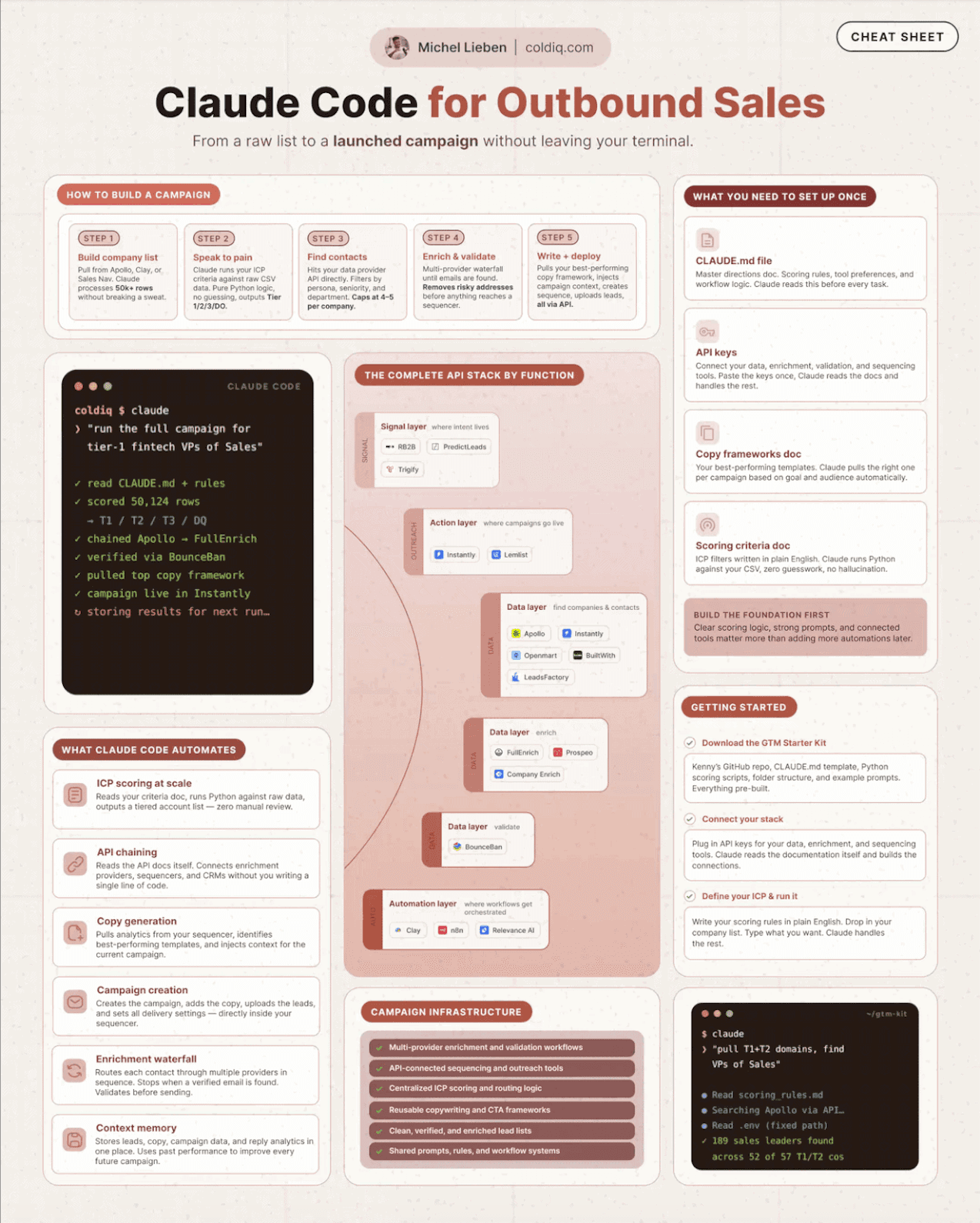
Claude Code turns cold campaign building from a multi-hour, multi-tool slog into a single terminal session. Here is the seven-step process we use to go from a raw list to a ready-to-send campaign: list building, ICP scoring, intent signals, decision-maker filtering, waterfall enrichment, batched copy generation, and a post-launch feedback loop that lets campaigns auto-improve.

Michel Lieben
Michel Lieben
JUN 4 2026
Our 7-Step Process for Building Cold Campaigns Inside Claude Code

Table of content

1. List Building
Lookalike Finder Tool
2. Account Scoring and Tiering
3. Intent Signals
Intent Signals Tool
4. Decision-Maker Filtering
People Finder Tool
5. Data Enrichment and Validation
6. Copy Generation and Deployment
7. Feedback and Auto-Improvement
8. The Setup That Makes This Work
GTM Report Tool

Share article

Talk to a GTM engineer

Creating cold outreach campaigns used to take hours. List building, enrichment, copywriting, and campaign setup each lived in a separate tool, and every handoff between them cost time and introduced errors.

Claude Code collapses that work into minutes. It handles list building, data enrichment, personalized copywriting, and launching new campaigns without you ever leaving the terminal.

We run outbound for 70+ B2B clients, and this is the exact seven-step process we use to go from a raw company list to a ready-to-send campaign inside a single session.

1. List Building

There are several ways to build the source list, and Claude Code handles all of them from one place.

Lookalike targeting is the first. Using PredictLeads, you find companies that resemble the ones already paying you, then expand outward from accounts that have a proven fit.

You can also pull leads from standard B2B databases. Apollo.io, CompanyEnrich, and Sales Navigator each cover different slices of the market, and Claude Code processes 50,000+ rows from large CSV files without choking.

Lookalike targeting is the fastest way to clone accounts that already convert, and we built a mini tool that runs the same logic on your customer list.

You can find companies similar to your best customers here, for free:

Lookalike Finder Tool

Fields marked with * are required

Please enter a professional email address

Bot protection
Loading...

Quick examples:

2. Account Scoring and Tiering

A raw list is not a campaign. Before any outreach goes out, every account gets scored against our ICP.

We built custom GTM skills, including a lead-scoring skill, that run our ICP criteria against the full list. Claude Code reads each account, weighs the criteria the way a senior rep would, and assigns a score, autonomously, across the entire list at once.

From there we segment into three tiers. Tier 1 accounts get manual outreach. Tier 2 accounts go into multi-channel sequences. Tier 3 accounts run through email outreach. The tier decides how much personalization effort each account earns downstream, so the highest-fit accounts get the most attention.

3. Intent Signals

Scoring tells you who fits. Signals tell you when to reach out.

APIs such as PredictLeads and Trigify.io detect hiring activity, press releases, funding announcements, and social engagement. Claude Code calls the right API for each signal type and layers the results on top of the existing targeting, so a fresh trigger moves an account up the priority list automatically.

Based on these signal APIs, we built a mini tool that surfaces the same buying triggers without writing a line of code.

You can see which companies are showing intent in your space right now, for free:

Intent Signals Tool

Fields marked with * are required

Please enter a professional email address

Bot protection
Loading...

Quick examples:

4. Decision-Maker Filtering

Targeting the right company is only half the job. You still need the right people inside it.

APIs such as LeadsFactory return multiple decision makers per company, filtered by the ICP definition: job title, seniority, and department. Claude Code pulls the relevant contacts for every account on the list, so a single company can surface a full buying committee rather than one stray name.

We packaged the same capability into a free tool that maps the decision makers at any target account.

You can identify the right contacts at your target companies here, for free:

People Finder Tool

FIND PEOPLE

Type domains, select personas, fetch real contacts.

0/5

Type LinkedIn company domain and press Enter to add

1/3

Persona 1

Define specific job titles and seniority levels to target the right decision makers

5. Data Enrichment and Validation

With the right contacts identified, the next step is finding verified ways to reach them.

Claude Code runs a waterfall across several providers to find phone and email data, starting with the highest-confidence source and cascading through the rest for the gaps. Apollo.io, FullEnrich, Prospeo, and CompanyEnrich each cover contacts the others miss, which pushes the match rate higher than any single provider could on its own.

Before the list reaches a sequencer, Claude Code cleans the risky addresses. Validation through BounceBan strips catch-all and high-risk emails so the campaign launches on a clean list and the sending domains stay protected.

6. Copy Generation and Deployment

Clean data is ready for copy, and this is where the process stops feeling like data work.

Claude Code pulls our best-performing campaign copy straight from lemlist or Instantly.ai through their APIs, then drafts custom copy built on the signals, current initiatives, and target persona behind each segment.

It works in batches of 100 to 200 leads at a time. Smaller batches keep quality control tight, so a weak angle gets caught and corrected before it goes out to thousands of contacts rather than after.

7. Feedback and Auto-Improvement

The process does not end at launch. This is the step that separates a one-off campaign from a system.

Claude Code analyzes campaign metrics after launch, gathers insights on the segments that perform best, and finds lookalikes of your top-converting leads to feed the next batch.

Campaigns improve on their own over time, in the same way a Meta Ads pixel sharpens as it gathers data. Each launch teaches the next one, so the targeting compounds instead of resetting every time you start fresh.

8. The Setup That Makes This Work

Going from prompt to ready-to-send campaign in minutes is real, but it sits on top of groundwork you build once.

Three pieces make up that foundation. A claude.md file holds your scoring rules, tool-calling preferences, and built-in workflow logic. Custom outbound skills encode the repeatable actions, like lead-scoring and tiering. API keys connect Claude Code to the data and sending layers it orchestrates.

The API stack is worth choosing deliberately, by layer. For data, we lean on Clay, Apollo.io, CompanyEnrich, and Openmart. For enrichment, Prospeo, FullEnrich, CompanyEnrich, and LeadsFactory. For signals, PredictLeads and Trigify.io. For orchestration, Clay, Relevance AI, and n8n. For action, Expandi, Instantly.ai, and lemlist. For validation, BounceBan.

Once that foundation is in place, building a campaign becomes a single prompt. If you want to understand where your current GTM motion stands before wiring this together, see how your approach compares below:

GTM Report Tool

Bot protection
Loading...

Please fill in all required fields *

---

Michel Lieben
Michel Lieben
Founder, CEO

Michel Lieben is the Founder & CEO of ColdIQ, a B2B sales prospecting agency trusted by 100+ organizations. He’s launched hundreds of outbound campaigns, mastered tools like Clay and Lemlist, and shares sharp, actionable insights on scaling sales with AI, automation, and strategy.

Share article

Talk to a GTM engineer

FAQ

Can Claude Code really build a cold outreach campaign without leaving the terminal?

Yes, the entire workflow runs inside one Claude Code session. It builds the list, scores and tiers accounts against your ICP, layers intent signals, filters for decision makers, enriches and validates contact data, and drafts campaign copy, all through API calls rather than separate dashboards. The key is that Claude Code calls each tool's API directly and processes the data in memory, so there are no CSV exports or copy-paste handoffs between platforms. What used to take several hours across six tools collapses into a single session driven by plain-English prompts.

What groundwork do you need before Claude Code can build campaigns this fast?

Three things have to be in place first. You need a claude.md file that holds your scoring rules, tool-calling preferences, and workflow logic so Claude Code knows how you operate. You need custom outbound skills that encode repeatable actions like lead-scoring and tiering. And you need API keys connecting Claude Code to your data, enrichment, signals, and sending layers. Without that foundation the prompt-to-campaign speed does not materialize, because Claude Code has nothing to orchestrate. The setup is a one-time investment that every future campaign then builds on.

How does Claude Code score and tier leads against an ICP?

We built a custom lead-scoring skill that runs our ICP criteria against the full list. Claude Code reads each account, weighs the criteria the way an experienced rep would, and assigns a score across the entire list at once rather than one account at a time. It then segments accounts into three tiers: Tier 1 for manual outreach, Tier 2 for multi-channel sequences, and Tier 3 for email outreach. The tier determines how much personalization effort each account receives, so the highest-fit accounts get the most attention while lower tiers still get covered efficiently.

Which APIs power the campaign-building process inside Claude Code?

The stack is organized by layer. Data sourcing runs on Clay, Apollo.io, CompanyEnrich, and Openmart. Enrichment uses Prospeo, FullEnrich, CompanyEnrich, and LeadsFactory. Intent signals come from PredictLeads and Trigify.io. Orchestration runs through Clay, Relevance AI, and n8n, while the action layer uses Expandi, Instantly.ai, and lemlist for sending. Email validation runs through BounceBan to strip risky addresses before launch. Choosing one or two tools per layer keeps the stack lean and avoids paying for overlapping coverage.

How do campaigns built in Claude Code improve over time?

Claude Code analyzes campaign metrics after launch instead of treating each send as a one-off. It gathers insights on which segments perform best, then finds lookalikes of your top-converting leads to feed into the next batch. This creates a feedback loop where each campaign informs the next, similar to how a Meta Ads pixel sharpens its targeting as it accumulates data. Over multiple launches the targeting compounds, so results trend upward rather than resetting every time you start a new campaign from scratch.

More articles

Discover more articles on the same topic.

MAY 24, 2026
11 GTM APIs Worth Plugging Into Your AI Agents

Eleven GTM tools stand out as worth integrating with AI agents like Claude Code, split across three categories: data feeds that power agents (CompanyEnrich, LeadsFactory, Apollo, Prospeo, PredictLeads), platforms for building agents (Openmart, Nooks, Relevance AI, lemlist), and orchestrators that do both (Clay, Instantly). Each was selected based on API quality, MCP support, coverage, and how cleanly an agent can drive it end-to-end without a human in the loop. The practical playbook stacks them into four layers (data, signals, orchestration, execution), where an agent typically needs one tool per layer rather than all eleven.

Michel Lieben
MAY 21, 2026
How to Run LinkedIn Outreach Like the Top 1%

Expandi analyzed over 100,000 LinkedIn outreach conversations and found seven repeatable patterns behind the highest-performing campaigns. The biggest lifts come from personalization, three-step sequences, and warm connection requests sent right after a profile view or post like. Short messages, conversational copy, multi-channel follow-up, and references to recent activity round out the playbook. The four-tool stack behind it is Expandi for automation and sequencing, Clay for enrichment and intent signals, LinkedIn Sales Navigator for list building, and Zapier for workflow glue. Top performers do not send more messages. They layer the patterns together so the lifts compound.

Michel Lieben
MAY 19, 2026
How We Turned 24 Employees Into LinkedIn Influencers

We turned 24 ColdIQ employees into LinkedIn influencers using a five-part playbook: a quarterly internal challenge with cash prizes, full-time designers and content tools to remove friction, 1:1 and group coaching with external LinkedIn experts, hiring people who already wanted to build their brand, and founder-led example setting with the CEO publishing 60+ posts per quarter himself. In under 90 days, the team published 581 posts, gained 34,023 new followers, and added $151,000 in MRR plus 27 new clients. The combined team audience now exceeds 250,000 followers with 15 teammates past 5,000.

Michel Lieben
Available to Hire
User 1
User 2
User 3
User 4
User 5
User 6
User 7

Make your cold emails count

No setup rituals. No DNS sorcery. Just emails that send, land, and look damn good doing it. Get started now. Because why wait?