

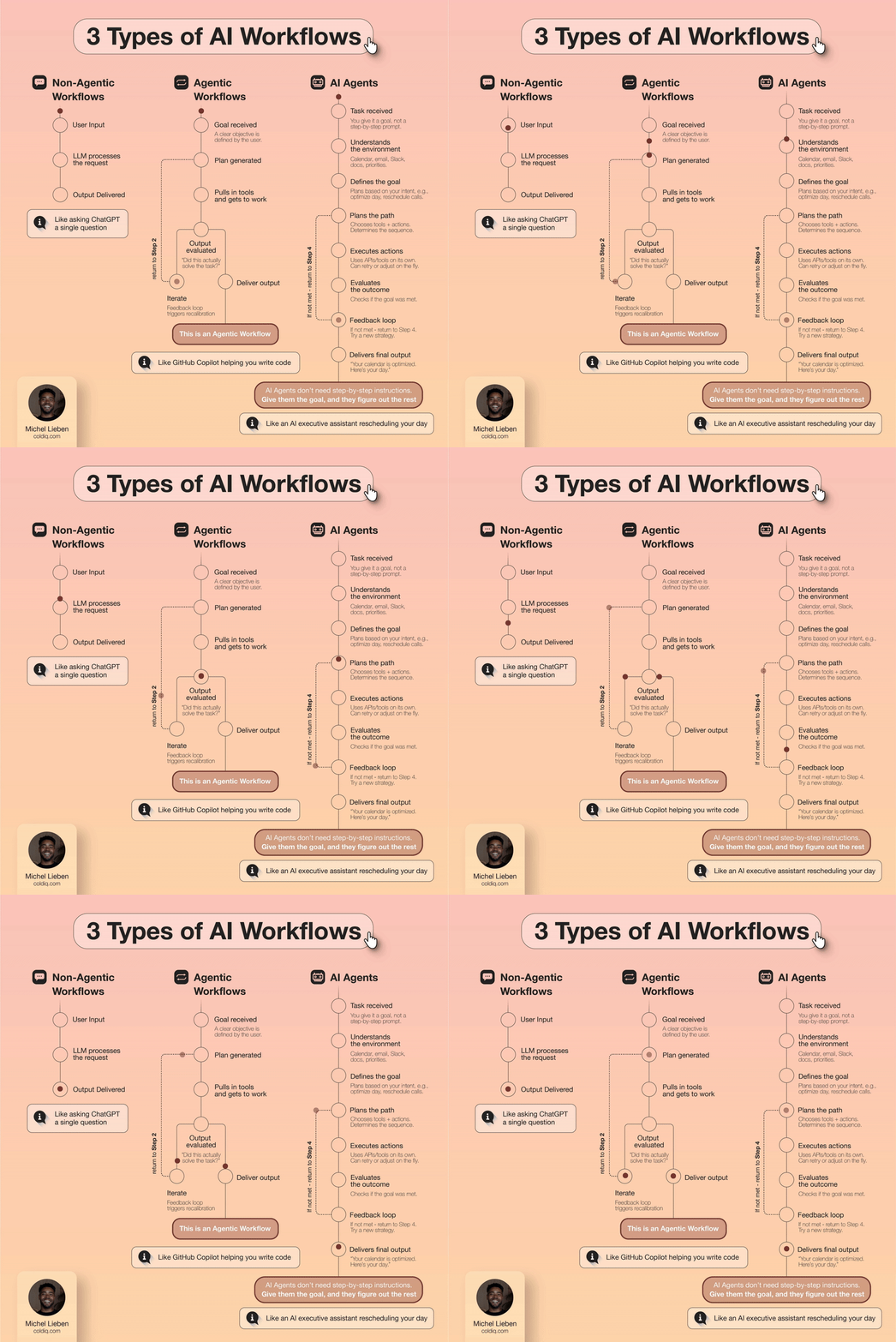
By 2027, roughly 80% of companies are expected to adopt AI agents. The problem is that most of them will not know what they adopted.
The term "AI agent" gets thrown around loosely. A chatbot that drafts emails gets called an agent. A Zap that triggers when a form is submitted gets called an agent. A workflow that checks a calendar and sends a reminder gets called an agent. None of these are agents. They are automations and workflows wearing a label they did not earn.
This confusion matters because each approach solves different problems. Using a workflow where you need an agent means you will hit a wall the first time something unexpected happens. Using an agent where a simple automation would do means you are burning money and adding complexity for no reason.
We run all three at ColdIQ across our outbound operations, and each one has a clear place. Here is how we think about the difference, illustrated through one recurring task: scheduling a quarterly business review with a major client.
1. Non-Agentic Workflows: Human Thinking, AI Doing
In a non-agentic workflow, the human does all the thinking. AI handles isolated tasks when prompted, but it never initiates anything and it never connects the dots between steps.
Here is how the quarterly business review plays out:
A sales manager remembers it is time for a review with a key account. They check their calendar in Attio and look up the client's recent activity. They open OpenAI or Claude and type: "Draft an email to schedule a quarterly business review with a client named Sarah." The AI drafts an email. The manager edits it, adds the right meeting times, and sends it manually.
The AI did one job: generate text on demand. It did not know who Sarah was. It did not check the calendar. It did not know the review was overdue. It did not look at account health. It responded to a prompt, produced some words, and stopped.
This is how the majority of teams use AI today. They plug it into existing manual processes as a content tool. The human still orchestrates every step, decides when to act, gathers the context, and determines what to do next.
Non-agentic workflows work fine for tasks where the thinking is simple and the volume is low. If you schedule one or two business reviews per month, opening a CRM and prompting an LLM takes five minutes. There is no reason to automate it.
But when you have 40 clients and quarterly reviews stacking up, manually remembering who is due, checking each calendar, drafting each email, and sending each one becomes a time sink that compounds every quarter.
2. Agentic Workflows: Automated Triggers With Fixed Logic
An agentic workflow adds automation to the process. It runs on triggers, follows conditional logic, and executes predefined steps without human involvement. But it does not think. It follows a script.
Here is the same quarterly business review in an agentic workflow:
A calendar-based trigger fires inside n8n or Zapier because 90 days have passed since the last recorded business review. The workflow checks the manager's calendar for open slots in the next two weeks. It pulls a pre-written email template, inserts the client's name and the available times, and sends the email through Instantly or the company's email provider.
No human had to remember the review was due. No human had to check the calendar. No human had to draft or send the email. The workflow handled the entire sequence from trigger to send.
This is a significant step up from non-agentic workflows. It eliminates the manual overhead for predictable, repeating tasks. And for 80% of the quarterly reviews you send, this works perfectly.
The remaining 20% is where it breaks.
What happens when the client does not reply? The workflow does not follow up, because follow-up logic was not built in. What happens when the client replies asking to reschedule to a different week? The workflow does not parse the reply. What happens when the client's account health dropped significantly last month? The workflow does not check, because it was only told to check calendar availability, not CRM data.
Agentic workflows are powerful for structured, repeatable sequences. But they are brittle when the situation changes. Every edge case requires a new branch of logic that someone has to build and maintain.
We use agentic workflows at ColdIQ for tasks where the inputs are predictable and the output does not need to change based on context. Lead enrichment pipelines in Clay are a good example. Data flows in, gets enriched through a fixed sequence, and comes out the other side ready for outreach. The steps do not change based on how a lead responds.
If you want to see where these kinds of automated workflows fit in your own outbound motion, we built a tool that maps your current GTM setup and identifies which steps are ready for automation.
You can get a full GTM breakdown based on your company profile, for free:
GTM Reports Tool
3. AI Agents: Goal-Oriented Autonomy
An AI agent does not follow a script. It pursues a goal. The distinction sounds subtle, but it changes everything about how the system behaves.
An agentic workflow answers the question: "What are the steps to send a quarterly business review email?" An AI agent answers a different question: "How do I keep this client happy and engaged?"
Here is what that looks like in practice:
The agent continuously monitors the CRM, checking client activity, product usage, support tickets, and conversation history. It detects that 90 days have passed since the last business review with a client named Sarah. But before drafting the email, it digs deeper. It checks Sarah's billing tier and notices her team recently added four new users. It also sees that those new users have barely logged in over the past three weeks.
Based on this context, the agent drafts a message that reflects the full picture: "Hey Sarah, I see your team recently added 4 users, but they do not seem to be using the platform much yet. Wanted to connect and make sure onboarding is going smoothly. Here are a few times that work next week."
The agent sends the email and monitors for a reply. If Sarah does not respond within three days, the agent sends a follow-up with additional time slots. Once the meeting is confirmed, the agent prepares an agenda based on past conversations and flags the low-usage pattern for the customer success team as a potential churn risk.
Compare that to the agentic workflow, which would have sent: "Hi Sarah, it has been 90 days since our last review. Here are some times to meet." Same trigger, vastly different output.
The difference comes down to three capabilities that agents have and workflows do not:
→ Context awareness: The agent pulls from multiple data sources (CRM, billing, usage, support) to understand the full situation before acting
→ Adaptive behavior: The agent changes its approach based on what it finds. A happy client gets a different email than one showing churn signals
→ Goal persistence: The agent does not stop after completing a single task. It monitors, follows up, escalates, and adjusts until the broader objective is met
At ColdIQ, we use Relevance AI to build agents that handle tasks requiring this kind of judgment. Our intent signal detection uses agents that monitor multiple data sources, cross-reference them, and decide which signals are worth acting on, rather than just passing raw data through a pipeline.
We built a tool that demonstrates how intent signals get layered and interpreted, similar to how an agent would evaluate whether a prospect is worth reaching out to.
You can identify which companies are showing buying signals in your space, for free:
Intent Signals Tool
Fields marked with * are required
Quick examples:
4. How We Use Each at ColdIQ
We do not pick one approach and force everything through it. Each has a clear role in our operations.
Non-agentic workflows handle one-off tasks where human judgment is the bottleneck and AI is just a content tool. When a team member needs to draft a custom proposal or write a one-time outreach message for a specific high-value prospect, they prompt Claude with context and edit the output. There is no automation because the task will not repeat in the same form.
Agentic workflows handle the bulk of our outbound pipeline. Clay runs enrichment sequences that pull data from multiple sources, score leads, generate personalized copy, and push contacts to Instantly for sending. n8n orchestrates our webhook routing, Slack notifications, and partner data forwarding. These workflows run on fixed logic and handle thousands of leads per week without human intervention.
AI agents handle tasks where the right action depends on context that changes. Relevance AI powers our signal analysis, where the agent evaluates whether a combination of hiring activity, tech stack changes, and funding events actually indicates buying intent, or is just noise. A fixed workflow would flag every signal equally. An agent weighs them against each other and prioritizes.
The pattern is straightforward:
→ If the task is one-off and judgment-heavy, a human prompts AI directly
→ If the task is repeatable and the steps are predictable, build a workflow
→ If the task requires adapting to changing context and pursuing a broader goal, build an agent
If you are figuring out which campaigns to run first, whether through workflows or agents, we built a tool that generates outbound campaign ideas based on your ICP and the data you have available.
5. The Practical Decision Framework
Before building anything, run through these questions:
→ Does the task repeat on a schedule or trigger? If not, a non-agentic workflow with human-driven AI prompting is enough.
→ Are the steps the same every time? If yes, build an agentic workflow. Define the trigger, map the steps, set the logic, and let it run.
→ Does the task require reading context from multiple sources before deciding what to do? If yes, you need an agent.
→ Does the task require follow-up, monitoring, or adapting based on the outcome? If yes, you need an agent.
→ Can a mistake in this task cost you a client or a deal? If yes, add a human-in-the-loop checkpoint regardless of which approach you choose.
The companies that will get the most out of AI by 2027 will not be the ones that adopted agents first. They will be the ones that matched the right approach to the right task. A well-built workflow will outperform a poorly scoped agent every time.
Start with your highest-volume repeatable tasks. Automate those with workflows. Then look at the tasks where your team keeps making judgment calls and where the outcome changes based on context. Those are your agent candidates.


