

Before sending a single email, you need to know who's worth reaching out to.
That's the job of TAM mapping. Your TAM (Total Addressable Market) is every company that could buy from you. Your TAL (Target Account List) is the ranked slice of that market you contact first.
We've run this process for 300+ companies through our agency, and we now run it end to end in Claude Code. Below are the 6 steps that take you from your CRM to the first email.
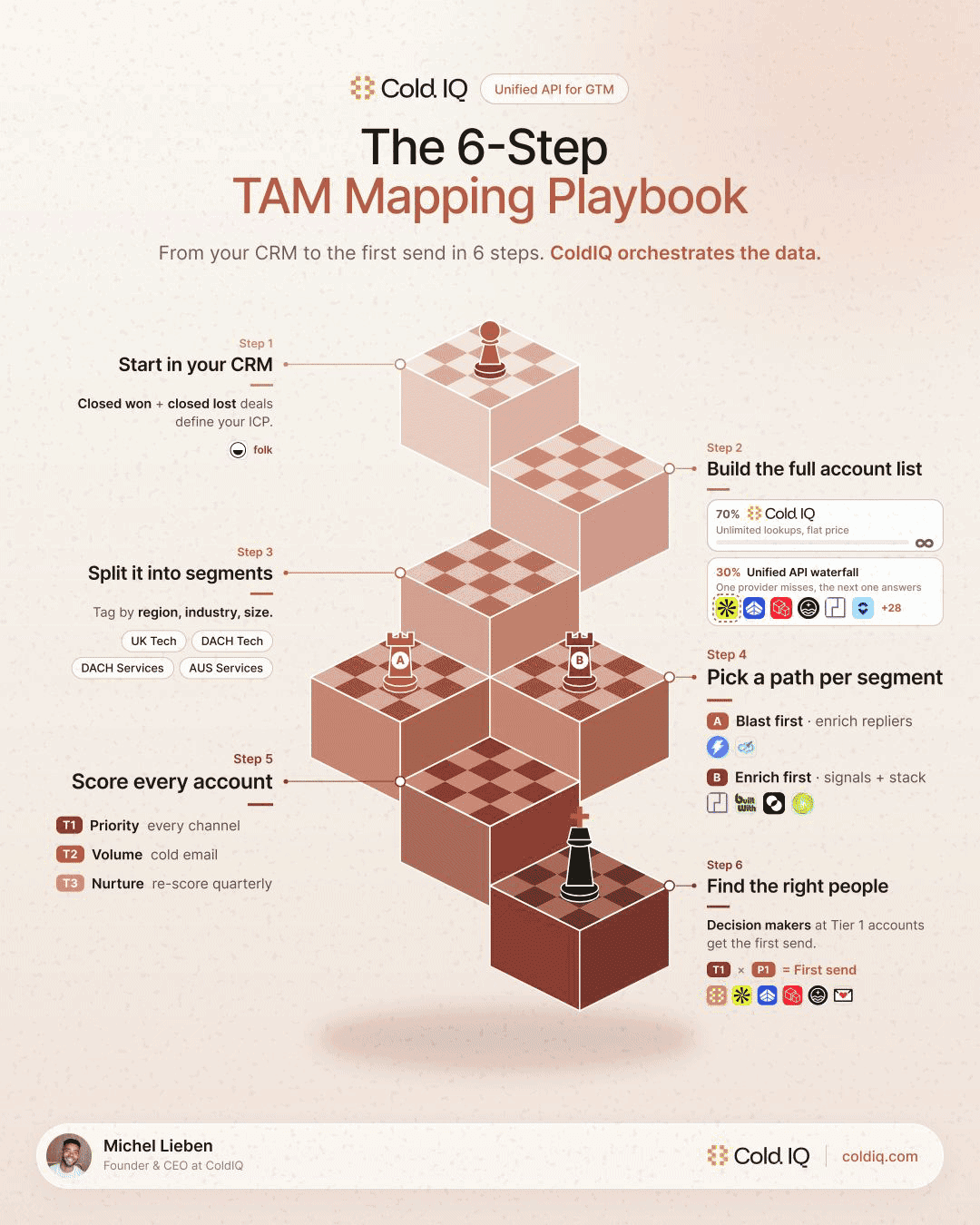
Each step follows the same shape: what you do, then the output you walk away with. The outputs stack, so every step feeds the next one.
1. Start With the Deals You Already Closed
Your closed-won and closed-lost deals already show who buys and who doesn't. They also show who to leave out, which matters as much as who to include.
Ask Claude Code to pull both sets from your CRM (we use folk) and compare them across five dimensions:
→ Industry
→ Company size
→ Region
→ Tech stack
→ Who signed the deal
The patterns that show up in closed-won and stay absent from closed-lost are your ICP. It's a simplified version of a full ICP model, and it's enough to start building the list.
If your CRM is thin, or you want a second read on your firmographic criteria, we built a tool that analyzes a company profile and extracts them for you.
You can generate a GTM report on your own company here, for free:
GTM Report Tool
Output: your ICP model, built from deals you've already won and lost.
2. Build the Full Account List, Wide on Purpose
Go wide here, on purpose. Segmenting and tiering come next, so right now you want every company that could fit.
We cast the first net in ColdIQ data. Lookups are unlimited, so over-including costs nothing. A company that doesn't fit gets filtered out during segmentation or scored low later on.
Then we pull from standalone providers through our unified API for extra coverage: Prospeo, AI Ark, Apollo. Each provider covers regions and industries differently, so stacking them closes the gaps a single database leaves.
Before anything else, remove your current customers and open deals. A cold email landing in the inbox of someone already in a sales cycle with you is the fastest way to undo months of work.
Another way to widen the list is to start from your best customers and look for companies that resemble them. We built a mini tool on that exact logic.
You can find companies similar to your best accounts here, for free:
Lookalike Finder Tool
Fields marked with * are required
Quick examples:
Output: your TAM, every company that could fit, minus the ones you're already talking to.
3. Split the TAM Into Segments With Their Own Offer
Tag every account by region, industry, and company size.
Then have AI validate those filters. Database industry tags are often wrong or too broad, so Claude checks each account against questions like these:
→ Is it a SaaS company or an agency?
→ Is it self-serve or sales-led?
→ Does it sell to SMB or enterprise buyers?
Segments matter because the message has to change with them. If you sell to both a US SaaS company and a German manufacturer, they can't get the same email.
Each segment gets its own offer later on. We broke down the segmentation side in more detail in our guide on how to segment your cold email lead lists.
Output: a TAM split into segments, each one waiting for its own offer.
4. Pick a Path for Each Segment
Segments don't all deserve the same treatment. Size and deal value decide how much you spend on each account before anyone replies.
Path A: blast first
Path A fits segments that are big by nature. A free offer goes to the whole segment through Instantly for email and Expandi for LinkedIn.
You only enrich the accounts that reply, so your enrichment spend follows interest.
Path B: enrich first
Path B fits segments where every account counts. You enrich first and filter the list down, then layer in intent signals and tech stack data from PredictLeads and BuiltWith. Then you enrich everyone left.
The trade-off is cost against precision. Path A spends little per account and lets replies do the filtering, while Path B spends more up front so no good account slips through. We covered the signal side in our guide on how to use intent signals.
Tech stack data is the easiest filter to start with in Path B, and it's what we built our tech stack mini tool around.
You can check which technologies any company runs here, for free:
Tech Stack Finder Tool
Quick examples:
Output: a path for every segment, so you know where your enrichment credits go.
5. Score Every Account to Turn Your TAM Into a TAL
Claude scores each account against the ICP model you built from your closed deals. This is where your TAM becomes your TAL.
Every account lands in one of three tiers:
→ Tier 1 gets priority on every channel
→ Tier 2 gets volume, cold email only
→ Tier 3 gets nurtured and re-scored every month
Tier 1 accounts are the ones worth a coordinated, multi-channel effort, which is how we approach them in our ABM strategy work.
Re-scoring is the part teams forget. A Tier 3 account today can become a Tier 1 account next month after a funding round or a leadership change. An unlimited data endpoint helps here, because re-checking thousands of accounts every month stops being a budget decision.
We built Claude Code skills based on the 300+ companies we've served through the agency to run this scoring for you. For the logic behind it, see our guide to AI in B2B lead scoring.
Output: your TAL, tiered by priority and refreshed every month.
6. Find Three People per Account
Three personas per account. In the best case, you get:
→ The decision maker, who signs
→ The champion, who uses the product every day
→ The deal influencer, who weighs in on the decision
We enrich people, emails, and phone numbers when needed with unlimited ColdIQ data first. When it misses, the single providers in our waterfall take over: Prospeo, FullEnrich, Findymail.
From there, the order is simple. Tier 1 × Persona 1 gets the first email.
Mapping the three personas is the slowest part to do by hand, so we turned it into a mini tool that lists the employees at any company.
You can identify the right people at your target accounts here, for free:
People Finder Tool
FIND PEOPLE
Type domains, select personas, fetch real contacts.
Paste a LinkedIn company URL or company domain and press Enter
Persona 1
Define specific job titles to target the right decision makers
Output: three contacts per account, with the decision makers at your top accounts first in line.
Your TAM Shows the Market, Your TAL Shows Who to Email First
At the end, your TAM shows you the whole market. Your TAL tells you who to email first.
The six steps build on each other. Closed deals give you the ICP, and the ICP shapes the list. Segments decide the offer, paths decide the spend, scoring decides the order, and personas decide who receives the email.
You can now run every step from one place. Start with unlimited ColdIQ data, then pull people, company data, and intent signals from your favorite providers, all through ColdIQ.
Hope this helps you build a TAM and TAL you can finally trust.